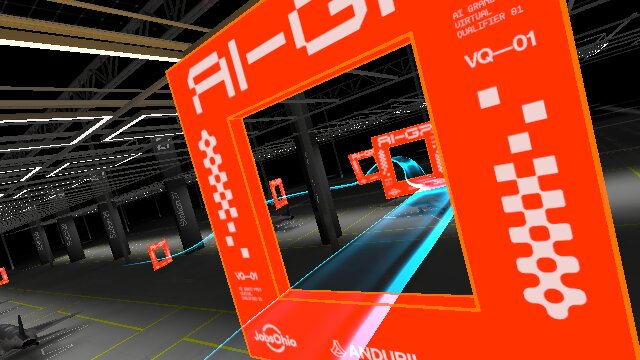
From a binary mask to a metric pose, to a physical command.
Autonomous drone racing brings perception and physics together: a drone must find its way through race gates using onboard sensing and software.
Our stack connects camera observations, known geometry, and inertial sensing to gate-aware flight commands. Vision finds the target; geometry places it in space; control turns that estimate into motion.
Visual perceptionMetric geometryFlight control
Designed to fly without human steering. The autonomy loop interprets sensor data, selects the next gate, and sends the commands that guide the simulated drone.
A high-level visual overview of our autonomous drone stack, from seeing a gate to moving toward it. Start anywhere; the illustrations make the ideas tangible.
02 / CAMERA & GEOMETRY
Pixels and motion share a geometric language.
A camera turns a three-dimensional scene into a flat image. Camera intrinsics describe that projection; known gate dimensions help translate the picture back into meters.
A
Pixels → normalized camera rays
r(u,v) = [(u − cx)/fx, (v − cy)/fy, 1]
A pixel gives a direction, not a distance. This ray has a forward component of 1, rather than unit length. A point at forward depth Z is pC = Zr; its straight-line range can be longer.
Camera axesRight · Down · Forwardx → right, y → down, z → forward.
Gate → camerapC = RCGpG + tCGRotate and move the gate into the camera’s coordinates.
ILLUSTRATIVE PROJECTION
Change the pose. Watch the view change.
Distance changes size. Rotation changes the visible rails. Move the gate in camera coordinates to explore both.
Estimated instance pixels: 15,100Projected gate
Pixel count covers visible rail material inside the image; the opening stays empty.
03 / PHYSICS & FLIGHT
A direction becomes a physical command.
Knowing where a gate is only starts the journey. The drone must tilt, accelerate, and manage its momentum to reach the opening with room to continue.
SIX DEGREES OF FREEDOM
Three ways to move. Three ways to turn.
Position changes along three axes. Roll, pitch, and yaw describe orientation. These motions are coupled: tilting the drone redirects its thrust.
FORCES & MOMENTUM
Turn thrust into a trajectory.
Thrust must counter gravity and change velocity. Drag resists motion; momentum carries the drone forward even after its aim changes. Control balances these effects continuously.
How a desired motion reaches the drone
Control concept
What it asks for
Place in this stack
Rate / ACRO
How quickly to rotate about each body axis.
A useful control concept; not the active command path described here.
Attitude + thrust
How to orient the drone and how much thrust to apply.
The active gate-aware controller turns target and vehicle estimates into these commands.
MAVLink
A common message format for telemetry and commands.
Carries the attitude-target message to the simulator bridge.
The camera captures the gates and the scene around them.
We explored many classical extraction methods. These five views show how target pixels become evidence for a geometric prediction. Contours & fitting · OpenCV ↗
Conceptual geometric fitting
STEP 1 / INPUT EVIDENCE
Keep the mask as evidence.
Start with the target pixels that survived detection. A connected patch may contain several gates, and one gate may appear in separate pieces.
Keep what was seen separate from what is inferred.
1 / 5
What the fit asks
Move and rotate a known gate until its projection agrees with the visible clues.
Target pixels belong inside the projected rails.
Clear background belongs outside them.
Visible edges should line up.
What the image leaves open
A missing pixel may reflect lighting, detection, or an obstruction. It does not prove that a rail is absent.
The fit can extend beyond the picture, but the image border is never treated as a physical gate edge.
BRING THE CLUES TOGETHER
Compare the gates as a whole.
One patch of pixels may contain more than one gate. Comparing candidate gates together helps explain the scene while keeping other plausible positions and orientations available.
05 / INCOMPLETE EVIDENCE
A plausible shape is not a fully observed pose.
Full rings, missing rails, cropped images, and overlapping gates offer different clues. A missing rail can be estimated, but it has not been seen.
The outer edge and opening help estimate size and tilt. A nearly face-on gate can still hide small rotations.
Useful evidence ≠ unique orientation.02
C-shaped support
Three visible rails help locate a gate, but more than one orientation may still fit.
The missing rail is inferred.03
Image clipping
A gate can continue beyond the picture. The edge of the image is a crop, not part of the gate.
The image border is not a rail.04
Overlapping gates
Touching shapes may belong to different gates. Their shared pixels do not reveal which gate is closer.
Connected ≠ one physical instance.05
Insufficient support
One rail or a tiny distant shape may not reveal enough to place and orient a gate reliably.
Unresolved is a valid result.
SQUARE + FRONT/BACK SYMMETRY
Different orientations. The same unmarked gate.
0°90°180°270°×
front / back
= 8
A square ring looks the same after a quarter turn. With identical front and back faces, it can also face the other way.
The camera cannot always tell these orientations apart. The flight system needs a consistent way to interpret the gate relative to the drone’s approach.
CAMERA · DRONE · GATE
A tilted view has more than one explanation.
The drone can roll while the gate stays still. Its IMU helps relate the camera’s view to the vehicle’s attitude.
That context helps interpret tilt; it does not make the gate’s identical sides visually distinct.
06 / IMU & TARGET MAPPING
Know how the drone moves. Keep the next gate in view.
A useful target must stay meaningful as the camera moves. Inertial sensing estimates vehicle motion; a persistent gate map connects successive observations to the next flight decision.
INERTIAL SENSINGIMU → vehicle estimate
Rotation and acceleration over time.
VISUAL SENSINGCamera → gate observations
Position relative to the camera.
1
Share a frame
Account for camera mounting and the drone’s pose.
2
Maintain the map
Associate observations with remembered gates.
3
Select the target
Track the next uncrossed gate and the one beyond it.
4
Guide the motion
Use target and vehicle estimates to compute a command.
Camera coordinates → vehicle coordinates → a shared local map.
Estimate, then keep checking.
Small sensor errors accumulate. IMU bias calibration and well-aligned observations matter because a drifting vehicle estimate can also move the mapped target.
Look through the next opening.
The active controller uses the target and next gate to shape its approach. This is gate-aware target selection; broader path-planning experiments remain separate workbenches.
07 / TIME & TRIANGULATION
A moving camera adds another point of view.
One lens can observe the same gate from several positions. Agreement across those views helps test an estimate and, with enough sideways motion, constrain its depth.
01 / identifyFind the same gate
Keep observations tied to a consistent target.
02 / moveChange viewpoint
Translation creates a new line of sight.
03 / compareCompare the rays
Estimated relative motion connects the two views.
04 / checkKeep the agreement
Strengthen a consistent estimate; reject weak or conflicting views.
Conceptual monocular triangulation: one camera, several positions.
More frames help when they add a useful viewpoint.
Pure rotation or almost identical views do not automatically reveal depth. Good association and a reliable estimate of camera motion remain essential.
The navigation and control system uses the current vehicle estimate, the selected gate, and the following gate to choose a direction of travel. It keeps the command simple: steer toward the opening, manage speed, and leave room for the next turn.
GATE-AWARE NAVIGATION
Aim through the opening, not just at the center.
The controller treats the selected gate as a corridor to pass through. Looking ahead to the following gate helps avoid overcommitting to a line that would make the next turn harder.
COMMAND SHAPING
Blend direction, speed, and attitude.
The system does not need to plan every meter of the course in advance. At each moment it compares where the drone is, where the gate is, and how fast it is moving, then updates attitude and thrust commands.
1
Pick the target
Use the map to choose the next opening.
2
Shape the approach
Balance direct motion with room for the following gate.
3
Command the vehicle
Convert desired motion into attitude and thrust.
4
Repeat quickly
Update as new telemetry and vision arrive.
A lightweight feedback loop: estimate, choose, command, observe again.
09 / NEXT STEPS
Build the stack into a broader autonomy platform.
The same loop that guides a drone through gates can grow into a reusable foundation for fast, vision-guided robotics: perception, mapping, planning, control, logging, and review working as one system.
Harden the full loop.
Turn the prototype pipeline into a repeatable runtime with clearer interfaces, stronger validation, and better simulation-to-flight checks. Each module should be easy to test on its own and predictable when connected.
Reliability
Expand beyond a single course.
Generalize the vision and mapping layers so the system can handle new gate layouts, lighting, camera positions, and obstacle-rich environments. The goal is not one memorized route, but adaptable navigation.
Scale
Use the stack for new applications.
The architecture can support more than racing: inspection paths, indoor autonomy, field robotics, synthetic-data generation, controller benchmarking, and interactive analysis tools for future vehicle experiments.
Applications
A platform for future autonomous flight work. From here, the project can grow from a gate-racing demonstrator into a reusable testbed for perception-driven navigation, aggressive control, and robotics research.